
Artificial intelligence keeps advancing quickly, and OpenAI’s ChatGPT 5 is the latest model getting attention. This release builds on earlier versions by improving usability, performance, and cost efficiency, making it a key topic for anyone following AI development.
In this article, you’ll find clear details about what sets ChatGPT 5 apart from previous models. We’ll cover how it works, the key differences, and pricing information. This will help you understand whether upgrading or trying the new version fits your needs. For broader context on AI progress, check out the latest in AI technology and how AI tools are transforming productivity across different fields.
Understanding ChatGPT 5: Core Features and Innovations
OpenAI’s ChatGPT 5 introduces several advancements that push the boundaries of conversational AI. From improved reasoning to broader language abilities, this iteration aims to deliver more natural, accurate, and adaptable user interactions. Below, we break down the key features that distinguish ChatGPT 5 from its predecessors and explore how these updates open new possibilities in real-world applications.
Enhanced Reasoning and Extended Context Memory
One of the major upgrades in ChatGPT 5 lies in its ability to reason more clearly and hold onto conversation context longer. Unlike previous versions that sometimes struggled with complex queries or lost track of earlier discussion points, ChatGPT 5 maintains a much deeper understanding across longer text spans. This extended context memory enables the model to:
- Follow multi-step instructions without losing track.
- Address nuanced questions with greater precision.
- Maintain coherence during lengthy conversations.
This improvement reduces the need for users to repeat or clarify information, making dialogues feel smoother and more logical. The model’s refined reasoning also helps it identify when it lacks certain facts, improving response reliability by avoiding guesswork.
Broader Language Support and Fluency
ChatGPT 5 expands its multilingual capabilities, supporting a wider range of languages with enhanced fluency. This iteration doesn’t just translate words but adapts to language-specific idioms, syntax, and conversational tones. It can switch effortlessly between formal and informal speech styles, delivering responses that feel native rather than machine-generated.
Key advancements include:
- Support for dozens of additional languages.
- More natural phrasing that fits cultural context.
- Better handling of slang, dialects, and tone variations.
These upgrades make ChatGPT 5 a valuable tool for global users, businesses interacting with international clients, and content creators aiming for authentic cross-language communication.
Notable Applications and Integrations
ChatGPT 5’s improvements have enabled new and expanded use cases across industries. Its enhanced reasoning and language skills make it ideal for productivity tools, creative projects, and AI assistant roles. Some standout examples include:
- Integration with productivity apps to automate complex tasks. For instance, the ChatGPT and Excel integration allows users to generate formulas, clean data, and analyze spreadsheets with simple prompts, significantly boosting workflow efficiency.
- Assistance in content creation, from drafting articles to editing, powered by features found in top AI content creation tools for bloggers and YouTubers.
- Support for creative industries, including scriptwriting, game development, and design brainstorming, where maintaining context and nuance is essential.
The growing integrations demonstrate ChatGPT 5’s role as a versatile AI partner, capable of adapting to specialized needs while providing clear, accurate interaction.
These core innovations position ChatGPT 5 as a more reliable, fluent, and practical AI model than its predecessors. Users can expect smoother dialogues, deeper understanding, and broader support for languages and applications. This makes it a sound choice for anyone looking to leverage advanced AI in everyday and professional settings.
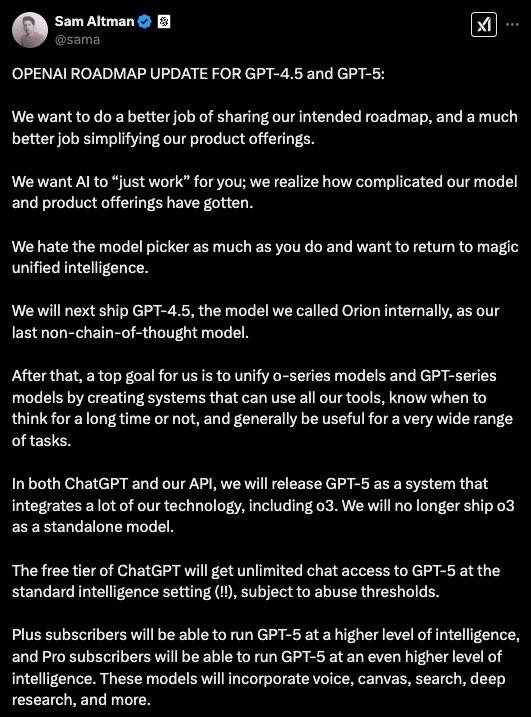
Is ChatGPT 5 Free? Understanding Access and Pricing
When new AI models like ChatGPT 5 launch, one of the first questions is whether they are available for free or behind a paywall. Access and pricing can vary, depending on how OpenAI chooses to distribute the technology and support its development costs. Here, we break down what you need to know about using ChatGPT 5 without unexpected surprises.
Free Access Options
OpenAI typically offers a version of its ChatGPT models for free to users, but with some limitations. These limits aim to balance accessibility so many can try the technology while managing server load and operational costs. For ChatGPT 5:
- There is usually a basic free tier allowing users to interact with the model for casual or experimental use.
- Free access may come with capped usage, such as a limited number of messages or restricted features.
- Response speed and availability might be lower on the free plan during high user demand periods.
This approach lets individuals, students, and developers explore ChatGPT 5 at no cost, but it may not suit heavy or professional use.
Paid Subscriptions and Enterprise Plans
For users needing more frequent or robust access, OpenAI offers paid options that provide higher limits and advanced features. Key aspects of these plans typically include:
- Priority access with faster response times and fewer restrictions.
- Increased message limits or even unlimited use for certain subscription levels.
- Access to enhanced capabilities unique to ChatGPT 5, such as improved context length or specialized integrations.
- Enterprise or API plans for businesses to embed ChatGPT 5 into applications or services, billed based on usage volume.
Pricing details for ChatGPT 5 align with previous models but can vary depending on the exact package and usage needs. Usually, monthly subscriptions range from affordable consumer plans to higher-tier professional offerings tailored for organizations.
How to Get Started
If you want to try ChatGPT 5, start by signing up on OpenAI’s platform. The free tier gives you a clear idea of the model’s capabilities without any upfront cost. If your needs grow, upgrading to a paid option is straightforward and adds valuable benefits.
For developers, OpenAI’s API access offers a pay-as-you-go structure, charging based on the number of tokens processed in your requests. This model suits those who want to integrate ChatGPT 5 into apps or workflows at scale.
Understanding these access levels helps set expectations and budget your AI use effectively. As with any advanced AI tool, the best plan depends on how deeply you want to use ChatGPT 5 and for what purposes.
For more on how AI tools like ChatGPT transform productivity, check out this guide on AI content creation tools for bloggers and YouTubers.
Key Differences: ChatGPT 4 vs. ChatGPT 5
OpenAI’s ChatGPT 5 builds on the foundation set by ChatGPT 4 but introduces changes that affect performance, reasoning, and user experience. Understanding these differences helps users decide if upgrading meets their needs.
Model Size and Performance
ChatGPT 5 features a larger and more complex model architecture compared to ChatGPT 4. This increase allows ChatGPT 5 to process information faster and handle more complex input, which improves its ability to manage multi-step tasks and maintain context for longer conversations. However, this also means ChatGPT 5 may require more computational resources, influencing cost and access options.
- ChatGPT 4: Well-optimized for balance between performance and efficiency.
- ChatGPT 5: Larger model, potentially more powerful but more resource-intensive.
Reasoning and Context Handling
A key upgrade in ChatGPT 5 is its improved reasoning ability. ChatGPT 5 stays on topic more effectively across long interactions, remembering previous details better than ChatGPT 4. This reduces the need to repeat or rephrase information in complex discussions.
- ChatGPT 5 follows multi-step instructions with higher accuracy.
- Logical consistency is stronger, reducing contradictory answers.
- However, some users noted that in creative tasks, ChatGPT 5’s responses might be more concise and less elaborate than ChatGPT 4’s.
Creativity and Language Style
While ChatGPT 4 excels in generating detailed and creative content, ChatGPT 5 tends to be more focused and direct.
- ChatGPT 4 provides richer storytelling and nuanced writing.
- ChatGPT 5 prioritizes clarity and speed, sometimes favoring brevity.
- This makes ChatGPT 5 more practical for work-related tasks but less suited for tasks that require imaginative depth.
Pricing and Access
ChatGPT 5’s advanced capabilities come with a different pricing structure. Initial reports suggest that usage costs for ChatGPT 5 could be higher due to the larger model and resource demands. OpenAI has maintained free tiers but limits may be stricter, encouraging users with heavier needs to opt for paid plans.
- GPT-5 likely to have higher operational costs.
- Users must weigh cost against improved efficiency and output quality.
User Experience and Applications
ChatGPT 5 integrates better with productivity tools and supports more languages with improved fluency. It also offers smoother dialogue management, which benefits industries like customer support, education, and content creation.
- Enhanced integration with software like Excel helps automate complex tasks.
- Broader language capabilities support global users more effectively.
For those interested in how AI tools fit into workflows and content creation, the AI content creation guide for bloggers and YouTubers offers insights into practical applications of these models.
Summary Table of Key Differences
| Feature | ChatGPT 4 | ChatGPT 5 |
|---|---|---|
| Model Size | Moderate | Larger, more complex |
| Reasoning | Good | Improved, better context tracking |
| Creativity | Rich, detailed | More focused, concise |
| Language Support | Wide | Broader, more fluent |
| Performance Speed | Balanced | Faster but more resource-heavy |
| Cost | Lower | Potentially higher |
| Application Suitability | Creative writing, general use | Productivity, complex tasks |
These distinctions make ChatGPT 5 a stronger choice for users needing precision and scalability, while ChatGPT 4 remains useful for tasks demanding creative depth. Understanding these differences helps you decide which version fits your goals and budget.
How to Use ChatGPT 5: Getting Started Guide
Getting started with ChatGPT 5 is straightforward, whether you’re a first-time user or upgrading from an earlier version. This guide will help you set up and begin interacting with OpenAI’s latest AI model to get the best experience from its advanced features. ChatGPT 5 offers more natural conversations, better understanding, and options to tailor interactions to your needs. Below, you’ll find key steps to get up and running quickly.
Create or Log into Your OpenAI Account
First, visit OpenAI’s official platform to access ChatGPT 5. You’ll need a valid account to start using the service. If you already have an OpenAI or ChatGPT account, just log in. If not, signing up requires providing a secure email address and creating a password.
- Visit OpenAI’s GPT-5 introduction page to learn about the latest features and sign in.
- Verify your email if prompted, which helps keep your account secure.
- Choose a subscription plan based on your expected usage, or start with the free-tier if available.
Account setup is quick and gives you immediate access to ChatGPT 5 through your browser or mobile device.
Navigating the Chat Interface
Once logged in, you’ll see a clean chat interface designed for easy interaction. The main window is where you type your messages, and responses appear promptly below.
Key interface elements include:
- Input box: Type your questions or commands here. ChatGPT 5 can handle simple queries or complex instructions.
- Send button: Click or press Enter to send your message.
- Settings or profile menu: Access options to customize your experience or manage your subscription.
- Personality or style toggle: Some versions offer toggles to switch ChatGPT 5’s response style or tone, useful for different tasks. For example, browsing how to use new ChatGPT 5 personalities helps customize output.
This clean setup keeps the focus on interaction, so you can communicate naturally.
Start with Simple Prompts
To get comfortable, begin by typing straightforward prompts related to your needs. ChatGPT 5 understands everyday language and will respond clearly. For example:
- Ask factual questions: “What is the capital of Croatia?”
- Request explanations: “Explain how solar panels work.”
- Try task-based commands: “Help me write a summary for my report.”
ChatGPT 5’s improved reasoning helps it provide precise answers. If needed, you can follow up with clarifications or ask it to expand on any reply.
Use Advanced Features
ChatGPT 5 includes options beyond basic chatting. You can:
- Use multi-turn conversations where the AI remembers context over a longer dialogue, allowing you to build on earlier points without repeating yourself.
- Access specialized modes for tasks like coding, tutoring, or brainstorming.
- Integrate with apps or APIs for automation or workflow support if you’re a developer.
Reading about ChatGPT 5’s capabilities in the official OpenAI help article provides detailed instructions on advanced uses, including message limits and usage policies.
Manage Usage and Limits
Be aware that ChatGPT 5, especially on free or basic plans, may have daily or hourly message caps. If you hit these limits, the system may switch to a lighter version or prompt you to upgrade.
- ChatGPT Plus subscribers get higher message thresholds.
- Managing your usage helps avoid interruptions in access.
Tips for Best Results
- Be clear and specific with your requests to get accurate answers.
- Use short sentences rather than overly long or complex phrasing.
- If responses seem off track, rephrase or add context to guide the AI.
- Experiment with different prompt styles and tones to find what works best.
Starting with these basics ensures you make the most of ChatGPT 5’s capabilities. As you grow familiar, you can explore integrations and more complex applications that fit your workflow.
For those curious about AI tools used in content creation, exploring resources like AI content creation tools for bloggers and YouTubers can show how ChatGPT 5 fits into real-world projects.
ChatGPT 5 in the AI World: Trends, Challenges, and Future Potential
ChatGPT 5 arrives at a point when AI development is accelerating steadily but also facing new technical and ethical challenges. This model represents not just an upgrade in conversational skills but also a wider shift in how AI is expected to perform complex tasks with better accuracy and understanding. As you explore ChatGPT 5, it helps to see it as part of broader trends shaping artificial intelligence today, while also keeping an eye on the hurdles and future possibilities that come with such powerful tools.
Trends Shaping ChatGPT 5 and AI Models
The launch of ChatGPT 5 reflects several key trends within AI development:
- Increased Model Complexity: ChatGPT 5 uses a larger and more intricate architecture, pushing its reasoning and contextual understanding to new levels. This trend aims to reduce errors and improve nuanced interactions, making AI more reliable for professional and everyday use. Recent reports suggest the model now performs at what OpenAI describes as “PhD-level” in areas like coding and writing, highlighting this rise in capability (BBC article on GPT-5).
- Wider Accessibility: With millions of ChatGPT users worldwide, OpenAI has designed GPT-5 to be integrated across various applications, ensuring widespread availability. This accessibility trend supports AI usage beyond tech specialists, into education, business, and content creation.
- Multimodal Abilities and Integration: Current AI models, including ChatGPT 5, tend to handle multiple input formats like text and images, improving their usefulness. This trend also includes tighter integration with productivity tools and APIs, allowing users to automate tasks efficiently.
Challenges Facing Advanced AI Like ChatGPT 5
Despite progress, ChatGPT 5 and other advanced AI systems face significant challenges:
- Accuracy Under Pressure: Studies have shown that even state-of-the-art AI models can struggle when handling complex, real-world problems. For instance, a recent paper from Apple revealed that advanced AIs may suffer “complete accuracy collapse” when pushed to their limits on complicated tasks (The Guardian report).
- Ethical Concerns and Bias: As AI becomes more embedded in decision-making, the risk of biased outcomes and privacy issues grows. Handling these responsibly requires ongoing efforts to increase transparency and control algorithm fairness.
- Resource Demands: Models like ChatGPT 5 require massive computational power, consuming extensive electricity and creating sustainability concerns. This challenge affects both cost and environmental impact, posing a hurdle for scaling AI responsibly (Article on AI challenges).
- User Trust and Reliability: Despite improvements, AI systems still produce errors or misleading responses at times. Ensuring users can trust these tools means continuous refinement and clear communication about AI limitations.
Future Potential of ChatGPT 5 and AI Technologies
Looking ahead, ChatGPT 5 sets the stage for several promising developments:
- Enhanced Collaboration: As AI becomes better at understanding complex instructions and context, it will serve as a more effective partner in both creative and technical tasks. This makes it suitable for industries like software development, content creation, and customer support.
- Customizable AI Experiences: Future iterations will likely offer more control over tone, style, and depth, letting users tailor interactions to specific needs.
- New Use Cases in Automation: Deeper integration with tools such as spreadsheets, email clients, and project management software will automate routine work, freeing users for strategic tasks.
- Expansion Across Languages and Cultures: ChatGPT 5’s improved multilingual capacities will help bridge communication gaps globally, creating more inclusive AI experiences.
Recognizing these trends, challenges, and potential helps frame ChatGPT 5 not just as a product but as a step in the evolving AI ecosystem. For users interested in detailed updates about AI tools and their applications, exploring resources like AI content creation tools for bloggers and YouTubers offers practical insights into integrating ChatGPT and similar models into daily workflows.
Conclusion
ChatGPT 5 represents a significant step forward in AI conversation models. It offers improved reasoning, longer context retention, and broader language support, making it suitable for more complex and diverse tasks. The pricing model balances free access with paid plans for users needing higher limits or business-grade features.
This model fits especially well in productivity environments where precise, focused responses and integration with tools are key. At the same time, users should factor in resource demands and the potential for higher costs when choosing ChatGPT 5 over earlier versions.
Your experience with ChatGPT 5, whether for work, study, or creativity, will shape how these advances affect daily tasks. Feel free to share your insights and challenges with this AI, as real-world feedback helps improve future iterations and expands understanding of its practical value.



Leave a Comment