
Unraveling Conti Ransomware: A Comprehensive Guide to Digital Forensics with Splunk
Welcome back, future digital forensic experts!
The landscape of cybercrime is evolving rapidly, with attackers continuously finding innovative methods to infiltrate systems. Among the most notorious ransomware groups in recent years is Conti. This group operated with a level of sophistication akin to a legitimate business, featuring specialized teams focused on malware development, network infiltration, victim negotiations, and even offering “customer support” for ransom payments. Their targets included governments, healthcare institutions, corporations, and various high-profile organizations. Conti’s attacks typically involved encrypting systems, exfiltrating sensitive data, and demanding exorbitant ransom amounts.
For digital forensic investigators, Conti serves as a critical case study due to the extensive forensic evidence they left behind, ranging from custom malware samples to rapid lateral movement and significant data breaches. Although the group officially disbanded following the leak of their internal communications, many of their operators, tools, and techniques have resurfaced in subsequent attacks. This ongoing influence makes Conti’s methods relevant for forensic analysis today.
In this article, we will delve into a ransomware incident involving Conti malware and utilize Splunk to dissect how an Exchange server was compromised and the actions taken by the attackers once they gained access.
Understanding Splunk
Splunk is a powerful platform designed to collect and analyze vast amounts of machine data, including logs from servers, applications, and security tools. It transforms raw data into searchable events, visualizations, and alerts, enabling teams to monitor their systems in real time. Organizations primarily use Splunk for monitoring, security operations, and troubleshooting. Digital forensic teams also leverage Splunk’s capabilities to quickly aggregate evidence from various sources and identify patterns that would be time-consuming to uncover manually.
Utilizing the Time Filter
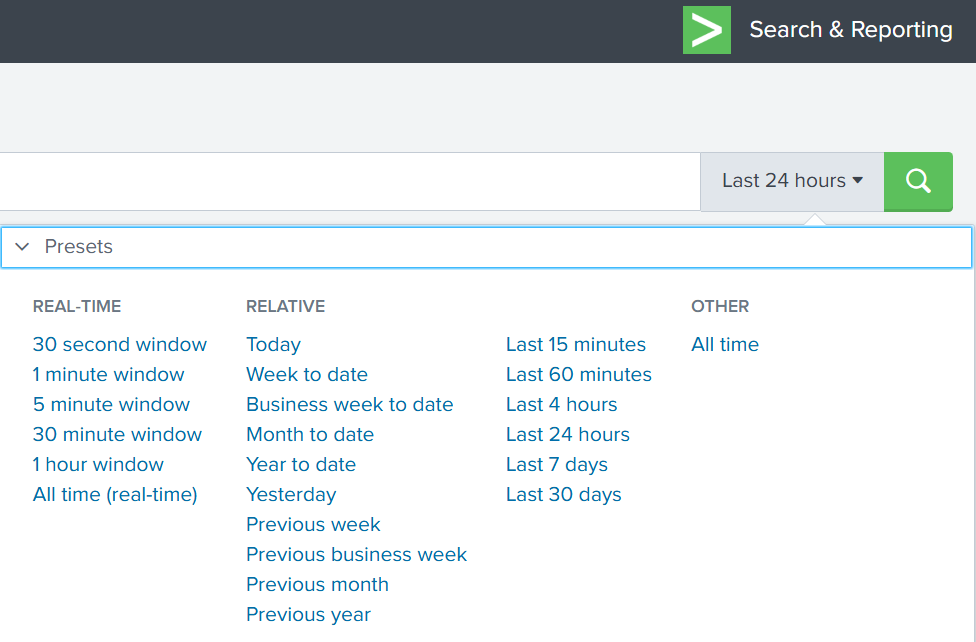
By default, Splunk’s time range is set to the last 24 hours. However, when investigating incidents like ransomware attacks, a broader time frame is often necessary. Adjusting the filter to “All time” can unveil older activities that may be linked to the attack. Many ransomware operations initiate weeks or even months before the final encryption occurs. While searching through all logs can be resource-intensive in large environments, this comprehensive view is crucial for our investigation.
Understanding Indexes
In Splunk, an index functions as a storage location for logs of specific types. For instance, Windows Event Logs may be stored in one index, firewall logs in another, and antivirus logs in yet another. When conducting a search, specifying an index directs Splunk to the appropriate location. However, since we are investigating a ransomware incident, we want to search across all available indexes:
index=*
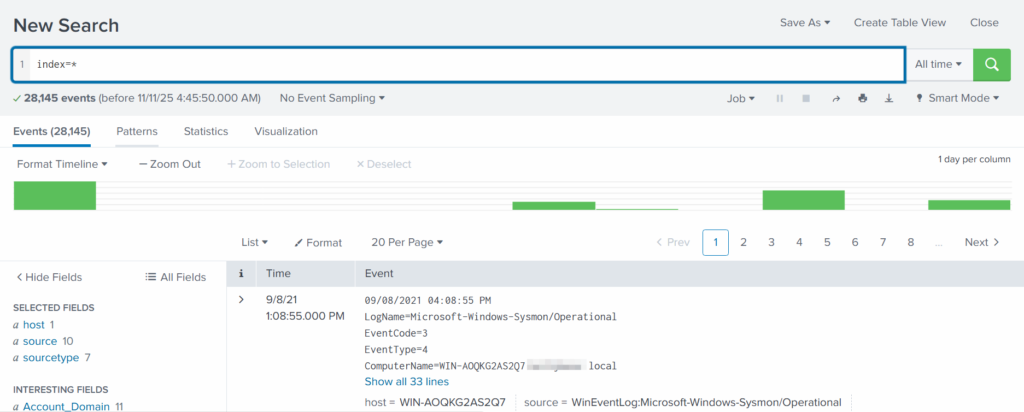
This approach ensures that no logs are overlooked, providing a complete view of the environment.
Exploring Fields
Fields are specific pieces of information extracted from each log entry, such as usernames, IP addresses, timestamps, file paths, and event IDs. They enhance the precision of your searches, allowing for filtering of events with expressions like src_ip=10.0.0.5 or user=Administrator. Understanding how to effectively utilize fields is essential for narrowing down search results and pinpointing relevant data.
Analyzing Conti Ransomware Attacks
To effectively analyze a Conti ransomware attack, it is crucial to understand the typical stages of such an incident. These stages often include:
- Initial Access: Attackers gain entry into the network through various methods, such as phishing emails or exploiting vulnerabilities.
- Execution: Once inside, the malware is executed, often leading to the encryption of files.
- Data Exfiltration: Attackers may steal sensitive data before or during the encryption process.
- Ransom Demand: Victims receive a ransom note demanding payment for the decryption key.
Understanding these stages allows forensic investigators to focus their efforts on identifying key indicators of compromise (IOCs) and understanding the attack’s progression.
Initial Access: How Did They Get In?
Conti ransomware often gains initial access through phishing campaigns or exploiting known vulnerabilities in software. Investigators should look for:
- Suspicious email attachments or links.
- Unpatched software vulnerabilities.
- Unusual login attempts from unfamiliar IP addresses.
By analyzing logs from email servers, firewalls, and intrusion detection systems, investigators can identify the entry point used by the attackers.
Execution: What Happens Next?
Once the malware is executed, it typically begins encrypting files on the infected system. Investigators should focus on:
- Identifying the processes initiated by the malware.
- Monitoring file access patterns for unusual activity.
- Checking for the creation of ransom notes or other artifacts.
Logs from endpoint detection and response (EDR) tools can provide valuable insights into the execution phase of the attack.
Data Exfiltration: Did They Steal Anything?
Many ransomware groups, including Conti, engage in data exfiltration prior to encryption. This tactic increases pressure on victims to pay the ransom. Investigators should look for:
- Large data transfers to external IP addresses.
- Unusual outbound traffic patterns.
- Access to sensitive files prior to encryption.
Network logs and data loss prevention (DLP) tools can help identify any unauthorized data transfers.
Ransom Demand: How Is It Communicated?
After the encryption process, victims typically receive a ransom note detailing the payment demands. Investigators should examine:
- The contents of the ransom note for clues about the attackers.
- The method of communication used (e.g., email, dark web).
- Any unique identifiers or patterns in the ransom demands.
Analyzing these elements can provide insights into the attackers’ motivations and potential future actions.
Best Practices for Digital Forensics with Splunk
When conducting digital forensic investigations, especially in the context of ransomware, following best practices can enhance the effectiveness of your analysis:
- Maintain a Chain of Custody: Document all evidence collection and handling procedures to ensure integrity.
- Utilize Comprehensive Logging: Ensure that logging is enabled across all systems to capture relevant data.
- Regularly Update Tools: Keep forensic tools and software, like Splunk, up to date to leverage the latest features and security patches.
- Conduct Training: Ensure that all team members are trained in digital forensics and familiar with the tools being used.
Implementing these best practices can significantly improve the quality and reliability of your forensic investigations.
Conclusion: The Ongoing Relevance of Conti Ransomware
As cyber threats continue to evolve, understanding the tactics and techniques employed by groups like Conti remains essential for digital forensic investigators. The insights gained from analyzing Conti ransomware incidents can inform future investigations and help organizations better prepare for potential attacks. By leveraging tools like Splunk and adhering to best practices, forensic teams can enhance their ability to respond to and investigate ransomware incidents effectively.
Frequently Asked Questions (FAQ)
What is Conti ransomware?
Conti ransomware is a sophisticated malware strain used by a notorious cybercrime group to encrypt files and demand ransom payments from victims.
How does Splunk assist in digital forensics?
Splunk helps digital forensic investigators by aggregating and analyzing machine data, allowing for real-time monitoring and identification of patterns related to security incidents.
What are the common signs of a ransomware attack?
Common signs include unexpected file encryption, ransom notes appearing on affected systems, and unusual network activity.
How can organizations protect themselves from ransomware?
Organizations can protect themselves by implementing robust security measures, including regular software updates, employee training, and comprehensive backup solutions.
What should I do if I fall victim to ransomware?
If you fall victim to ransomware, it is crucial to disconnect affected systems from the network, report the incident to authorities, and consult with cybersecurity professionals for recovery options.





Leave a Comment